Docs / Endpoints
Answering a caller
An endpoint has two doors. You have already used one: something POSTs to
/hooks/…, the platform says “got it”, and your script runs afterwards. The
other door is for callers who are not sending you news — they are asking you a
question and waiting for the answer.
Same endpoint, same authentication, same script rules. What changes is who is waiting, and that changes three things: how the caller is answered, how many scripts may take the call, and what happens when it goes wrong.
The two doors
/hooks/<tenant>/<env>/<path> | /api/<tenant>/<env>/<path> | |
|---|---|---|
| The caller | is answered at once, and never waits | waits for your run’s answer |
| Your script | is started; input.event.kind is webhook | sees api_service, and answers with respond(value) |
| How many scripts | every trigger that routes takes it | exactly one, or the call is refused |
| When it goes wrong | the call was accepted; the run fails on its own | the caller is told: 404 no endpoint · 500 the run failed · 504 no answer in time |
Nothing else differs. The run is queued, leased, isolated and budgeted exactly as any other run; it appears in the same run log; it can call the same functions.
One endpoint’s /api/… address has a third thing it can be: a door that offers
several of your calls and scripts as tools an assistant picks between, rather
than one script answering every call. That is
An endpoint an assistant can call, and everything on this
page about credentials, budgets and what a 504 means is true there too.
Answering
respond(value) is the answer. The value is sent as JSON, exactly as your
script shaped it — there is no envelope for the caller to unwrap.
const contact = FindContact({ email: input.event.body.customer });

respond({ known: contact !== null });

log("answered the caller");
return { checked: input.event.body.customer };
Three things that sample is showing.
The run keeps going. respond records the answer; it does not end the run.
Anything after it still happens — logging, a call, a dataset write.
The caller hears when the run FINISHES. The answer is sent at the end, not
at the moment you called respond. So work you do after answering is work the
caller is still waiting through: if it does not have to happen now, it does not
belong in this script.
The run’s own output is still its own. What you return is what the run
records and what the run log shows; respond decides only what the caller
receives. If you never call respond, the caller is handed the returned value
instead — so the shortest possible API script is one that just returns
something.
respond may be called once. A second call is an error in your script, because
one caller cannot be sent two answers. And calling it in a script that was not
triggered by a synchronous call is harmless: nobody is listening.
Exactly one script answers
A webhook endpoint may feed as many scripts as you like — they all get a copy. A synchronous endpoint cannot work that way: two scripts would produce two answers and the platform would have to pick one, which is a decision it has no business making. So the rule is exactly one, and both other cases are refused at once rather than left to time out:
- no script takes the call — the endpoint exists but nothing listens on it;
- several take it — the call is ambiguous.
Both are answered as failures rather than left to run out the clock. An ambiguous call says so, and names how many scripts took it. A call that reaches none is answered exactly as an endpoint nobody listens on: from outside they are the same fact, and spelling out which would tell an unauthenticated caller what your triggers filter on. The environment’s log says which it was.
That is also what makes several scripts on one synchronous endpoint workable: put a filter on each trigger — the condition beside it that says which calls it wants — so any given call leaves exactly one. A filter that narrows to nothing is the first case above.
A script that is switched off takes no call. Beside a script that is on, it makes nothing ambiguous; when it is the only one a call reaches, the caller is told at once that it is switched off rather than left to wait out its budget.
Asking for one thing by name
A door that answers one script is the simple case. A door that offers several things to ask for is an operation table: a list of names on the endpoint, each pointing at one configured call or one main script. A caller asks for one by putting its name on the end of the address:
POST /api/<tenant>/<environment>/<endpoint>/<operation>The bare address is untouched — it still means the single script routing leaves — and the extra segment is the addition. An operation has three things: its name, which is what a caller says and is lowercase letters, digits and hyphens; its target, picked from what the environment already configures; and a description, which is the one sentence on the whole card the platform cannot work out for you.
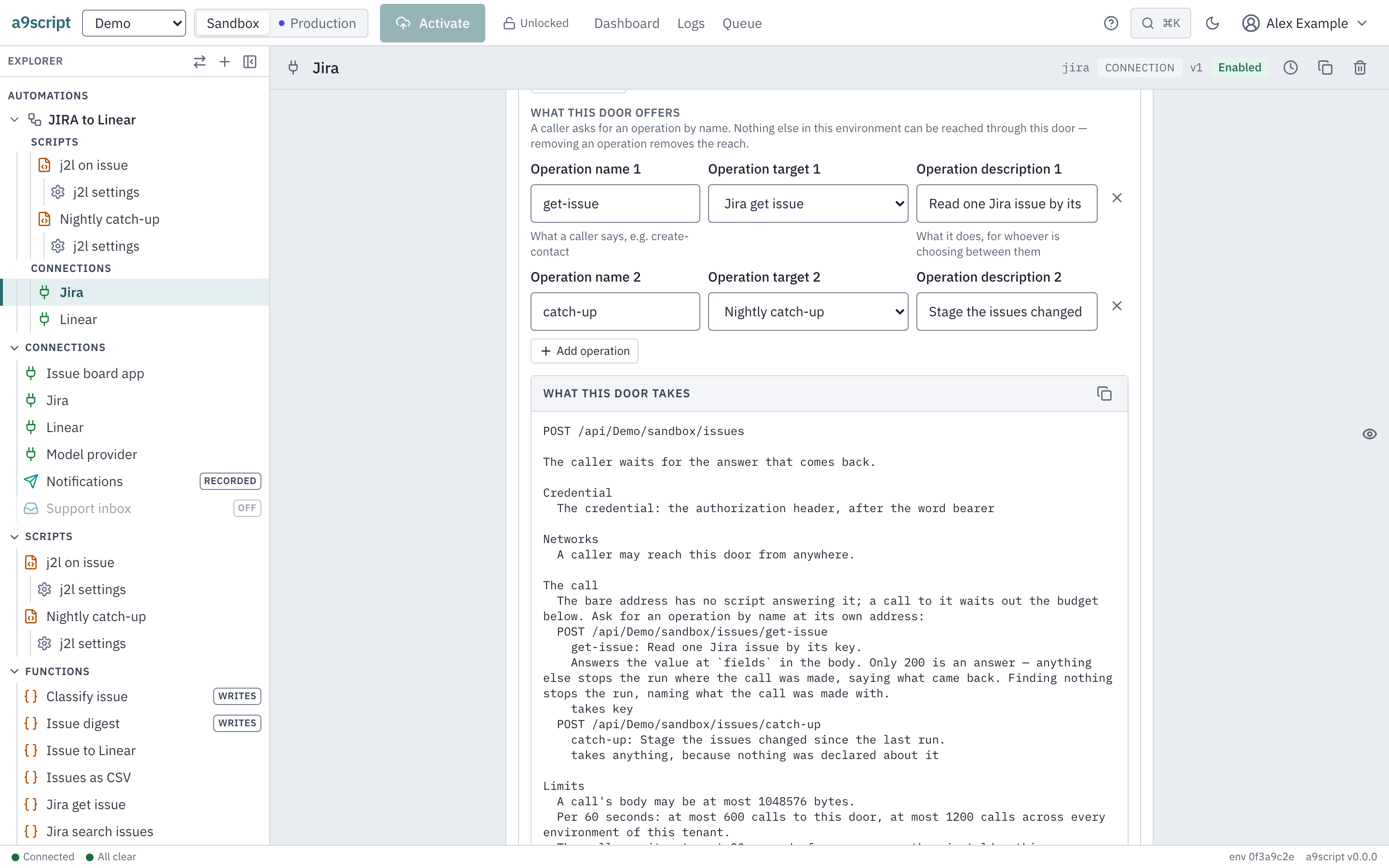
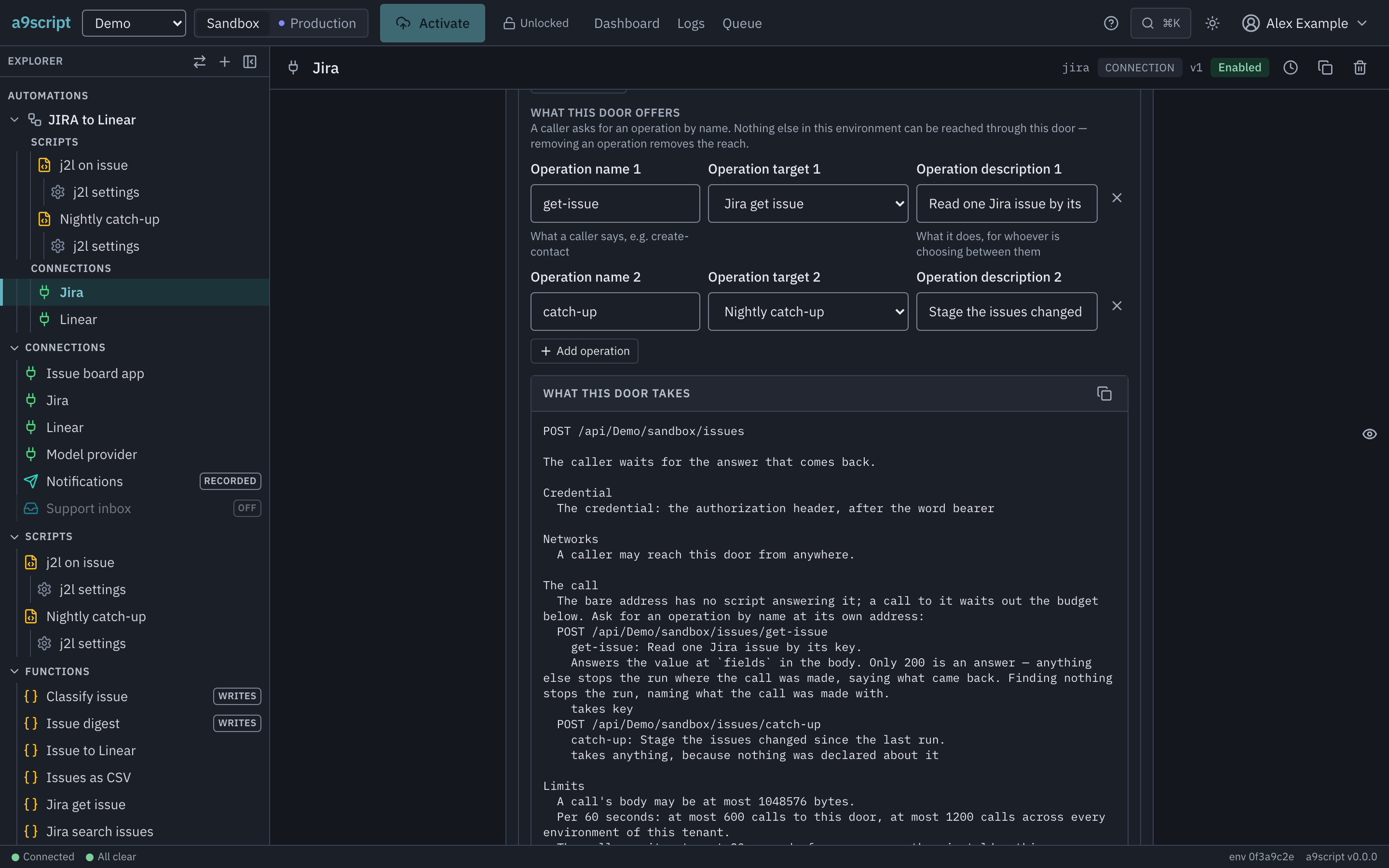
A target is not reachable because it exists. It is reachable because an operation names it, and only what an operation names can be asked for.
Who may call which
An endpoint can require the caller to be a signed-in person — one of your app users — rather than only the holder of the endpoint’s credential. Switch that on, and each operation then says who may reach it:
- anyone, signed in or not;
- anyone signed in, which is what an operation says when it says nothing;
- holders of particular roles, any one of the names being enough.
The role names here are the same names an administrator puts on a person, and there is no registry in between: write them in either order.
Three things answer identically — an operation that does not exist, one the caller is not signed in for, and one their roles do not reach. That is deliberate. A caller who could tell them apart would be able to read the door’s whole table off its refusals without ever holding a credential. Whether an operation is switched off is told only to a caller who can reach it, and by the operation’s name — never the name of what it runs.
Two rules worth knowing before you author one. Saying who may call an operation on a door that requires no identity is refused, not stored — there would be nobody for it to judge. And an operation offered without a description is allowed, because an unfinished door still has to be saveable, but you are warned about it when you activate: an assistant or a caller chooses between operations on that sentence alone.
Your script is told both: input.event.operation is the name that was asked
for, and input.caller is who asked — their id, their address and the roles
they hold. On a door that requires no identity there is no caller, and the
field is simply not there.
What the caller gets
| Status | When |
|---|---|
200 | The run succeeded. The body is your answer, as JSON — null if you answered nothing. |
404 | There is no such endpoint in that environment. |
409 | What the call reaches is switched off: SCRIPT_DISABLED, or FUNCTION_DISABLED for a configured call. Nothing ran, and nothing will run later. |
500 | The run failed, or the call reached no script or more than one. The body carries the failure’s code and message. |
503 | The environment’s configuration cannot be read just now (CONFIG_UNAVAILABLE). Nothing ran; try again. |
504 | No answer arrived inside the reply budget. |
Everything an endpoint refuses on its own — the wrong credential, an address it does not accept, the rate limit, an endpoint somebody switched off — is answered before any of the above, exactly as it would be at the webhook door. What is different here is only what happens once the call is in.
A 504 is not a cancellation of a run that had started. That run keeps going
and finishes normally — the caller simply stopped waiting for it, and the run is
in the log like any other. A call that had not started when its caller gave
up never starts: it was still waiting its turn — behind a script that runs one
at a time, while dispatch was paused, or while the configuration could not be
read — and it is dropped rather than run for nobody. A tool an assistant called
is treated the same way.
So before a caller retries after a 504, look in the script’s run log: if the
run is there, a retry starts a second run; if it is not, nothing ran and
nothing will. That is worth knowing before you make a synchronous endpoint do
something a caller must not have happen twice. (Stopping a run that should not
continue is an operator’s act, on When the work jams.)
The reply budget
A caller waits 30 seconds for its answer by default. Whoever runs the installation can change the number; a script cannot.
That number is the whole design constraint of a synchronous endpoint. Work that reliably fits inside it belongs here. Work that does not — a long import, a call to a system that throttles you, anything that pauses and resumes — belongs on a webhook endpoint, where nobody is holding a socket open. A run that suspends mid-answer does not shorten the caller’s wait; it guarantees the caller times out.
Trying it
The endpoint form shows the path. The whole call is:
curl -X POST https://a9script.example.com/api/acme/sandbox/lookup \
  -H 'content-type: application/json' \
  -d '{"customer":"ada@example.com"}'
Add whatever the endpoint’s authentication asks for — the same header or signature a webhook caller would send, because it is the same endpoint.
samples/api.sh is that call as a script you can keep: it
prints the answer, exits non-zero when the call did not answer, and keeps your
credential off the command line. samples/webhook.sh is its counterpart for the
other door.
What to read next
- Reading what triggered you — every door’s
input.event, including this one’s. - Limits and safety — every other number the platform holds you to.
- Reacting to failures — because a caller’s
500should not be how you find out. - An endpoint an assistant can call — the same address, offering many named operations instead of answering with one script.