Docs / Operating
Reacting to failures
An integration that nobody is watching is the normal case. It runs at two in the morning, it talks to a system that is occasionally down, and the first anybody hears about a bad night is a customer asking where their order went.
This page is about closing that gap. There are two ways, and most environments want both:
- a notification rule — the platform mails somebody. Nothing to write.
- a system trigger — the platform runs one of your scripts, handing it the failure. Anything you can write, you can do: open a ticket, post to a channel, call an ops API, retry something by hand.
What the platform reports
Ten occurrences, and they are the same ten wherever you choose them — in a notification rule, in a trigger, in the sample payloads. The first five are about runs and what they touch; the last five about a lane — the queue a door, a schedule or the resumed runs feed.
1An unattended run that fails becomes an occurrence: what broke and where, never the order or record that caused it.
2Layer 1: a notification rule mails the people it names, throttled so one bad night is not a hundred mails.
3Layer 2: a script with a system trigger runs on the same occurrence — through the same pipeline as a webhook, without waiting for the mail.
| Occurrence | What it means |
|---|---|
run.failed | A run did not do its work. It threw, it went over its budget, or it was stopped. |
run.retry_limit | A run gave up waiting: an external call kept asking to be resumed, and it ran out of patience. |
dlq.message | Queued work could not be delivered at all, after every attempt. |
health.red | Something was marked as failing — a run failed, a script reported a problem with logError, or the platform stopped calling a connection whose far end kept refusing to answer. |
metric.threshold | Runs got slower than a limit you set — see When runs get slower below. |
lane.filling | A lane will be full within half an hour, or is over 80% full — see When a lane fills, stalls or waits. |
lane.stalled | A lane’s waiting work has not moved for five minutes while the platform had room for it. |
door.refused | A door refused work in the last minute — its lane was full, or the rate limit held it. |
queue.waiting | The oldest waiting work has waited longer than a limit you set. |
schedule.skipped | A schedule’s due time was not fired, because the run of the time before still waited. |
“An entity is failing” is a transition, not a state. health.red fires when
something goes from fine to failing — once. A script that then fails every ten
minutes all night does not fire it again; it is already marked, and the mark
stays until somebody acknowledges it. That is the difference between this and
run.failed, which is one occurrence per failed run. Reading the mark and
clearing it is its own page,
When something is wrong.
Two things are true of all of them.
Only unattended work reports. Pressing Test in the editor never mails anybody and never runs a handler. The answer is already in front of you.
An occurrence carries no payload. It says what broke and where — the script, the run, the error’s own words — and never the order, the invoice or the customer record that caused it. If you need those, open the run: the occurrence tells you which one.
When runs get slower
metric.threshold is the one occurrence nothing reports on its own. Slow is not
a fact about a run, it is a comparison against a number somebody chose — so the
platform never guesses one. You set it where you listen for it — on a
notification rule, or on a system trigger (a script cannot add one without
it):
- which time — the queue wait (how long work sat before it started), the working time (how long the script itself ran, with any suspension taken out), or the total (what a caller experienced, arrival to finish);
- which percentile — the ordinary case, or the slow tail;
- the limit, in milliseconds.
The measurement is taken once an hour, over the last day’s runs, and only over runs that finished — a run still going has no duration yet. Leave the script list empty and it watches the whole environment; name a script and it watches that script alone, which is what turns “something is slow” into “this is slow”. The two are kept apart: a list left empty hears about the environment’s number, never about one script’s.
Each rule and each trigger hears its own limit. The number is measured once, however many listen, and each is told only when its own limit was passed — and told that limit: a rule set at ten seconds is never mailed about somebody else’s five.
When a lane fills, stalls or waits
The five lane occurrences are judged once a minute, and each is said twice:
once when the lane enters the condition, and once when it clears —
the body’s lane block says which in its on: true for the first, false
for the second. A lane
clears only past a gap below the mark it entered at, so a lane that hovers at
the mark is said once, not every minute: lane.filling clears once the lane
is three quarters of an hour from full and under 70% full, door.refused and
schedule.skipped after a quarter of an hour without a refusal or a skipped
time, queue.waiting once the oldest work is back under four fifths of your
limit, and lane.stalled once work is taken again or nothing waits — a
moment in which the platform had no room does not clear it. What is held is
kept across a restart of the platform: it is not said again, and a lane that
cleared meanwhile is said to have cleared.
queue.waiting needs a limit, as metric.threshold does — how long the
oldest waiting work may wait, in milliseconds, a minute at least — set on the
rule or the trigger that listens for it; one without a limit is said in the
platform’s log once an hour and hears nothing. Each limit is judged on its
own, so a rule at ten minutes is told about ten minutes, never about somebody
else’s five. A limit changed while a lane is past it starts afresh: the old
one’s clear reaches nobody, and the new one is said when the lane passes it.
The limit also turns the lane amber on the queue page and the dashboard.
door.refused counts every piece of work a full lane or the rate limit
turned away — a door’s request, and also a schedule’s or a trigger’s work
that found its lane full. A rule’s throttle counts all its occurrences
together, so on a busy hour the mail it holds back may be a clear: the
rule’s next mail says how many it held.
A lane carries many scripts’ work, so a lane occurrence names its lane — the
source in its lane block — and no script: a rule or trigger that lists scripts hears none
of them.
Three things follow from measuring rather than reporting. A day in which nothing finished crosses nothing — there is no measurement to compare, and the platform says nothing rather than reporting a zero. A limit that stays crossed is reported again by every hour’s measurement, so a handler runs once an hour for as long as it lasts. And a rule with no limit filled in watches nothing at all: it is saved, and it says so where it would have run. A system trigger saved before triggers had a limit of their own hears nothing either; activating its script warns about it, and replacing it with one that names its limit is the fix.
Layer 1: mail somebody
Create a notification rule, choose the occurrences you want, and give it an address. That is the whole setup.
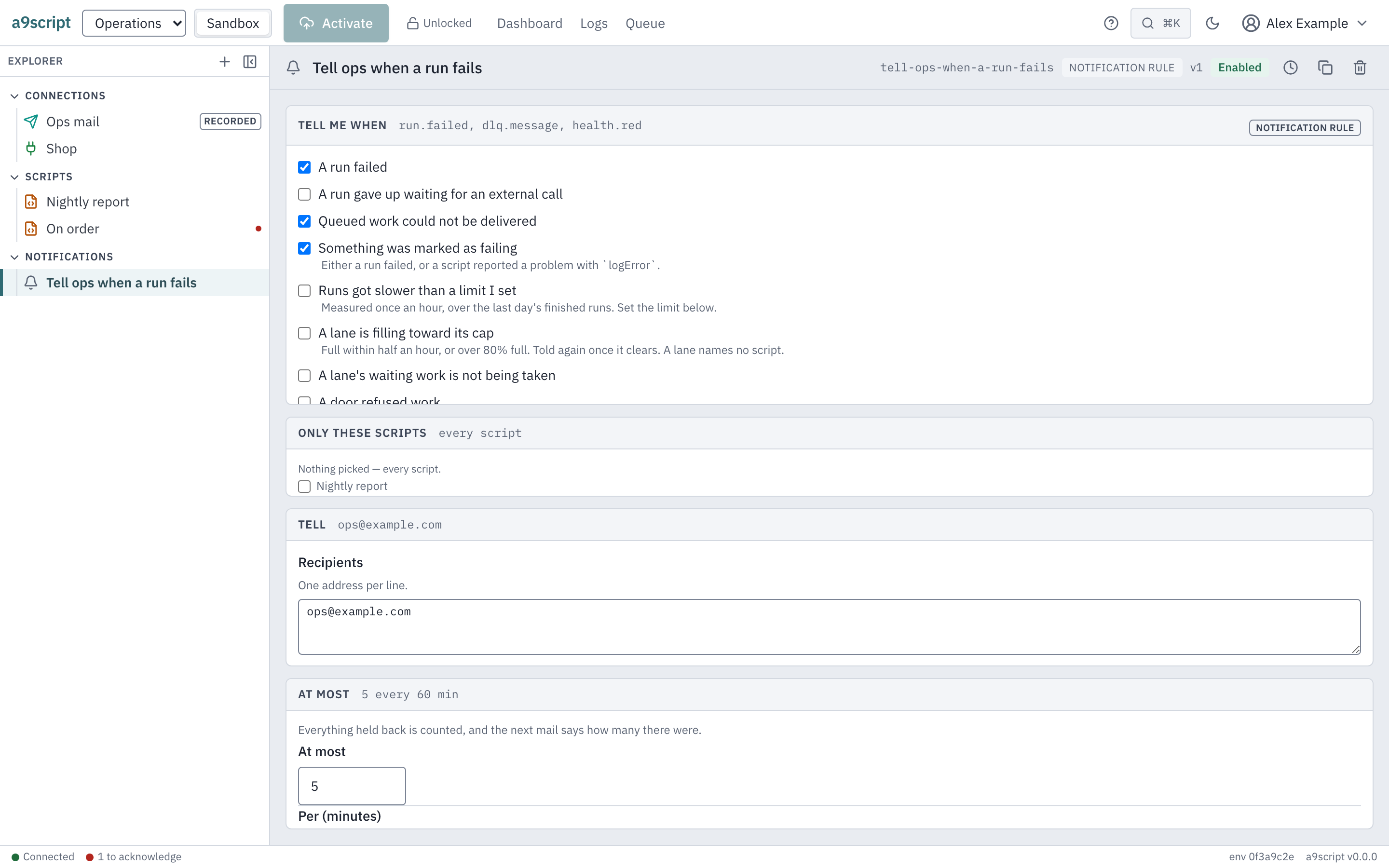
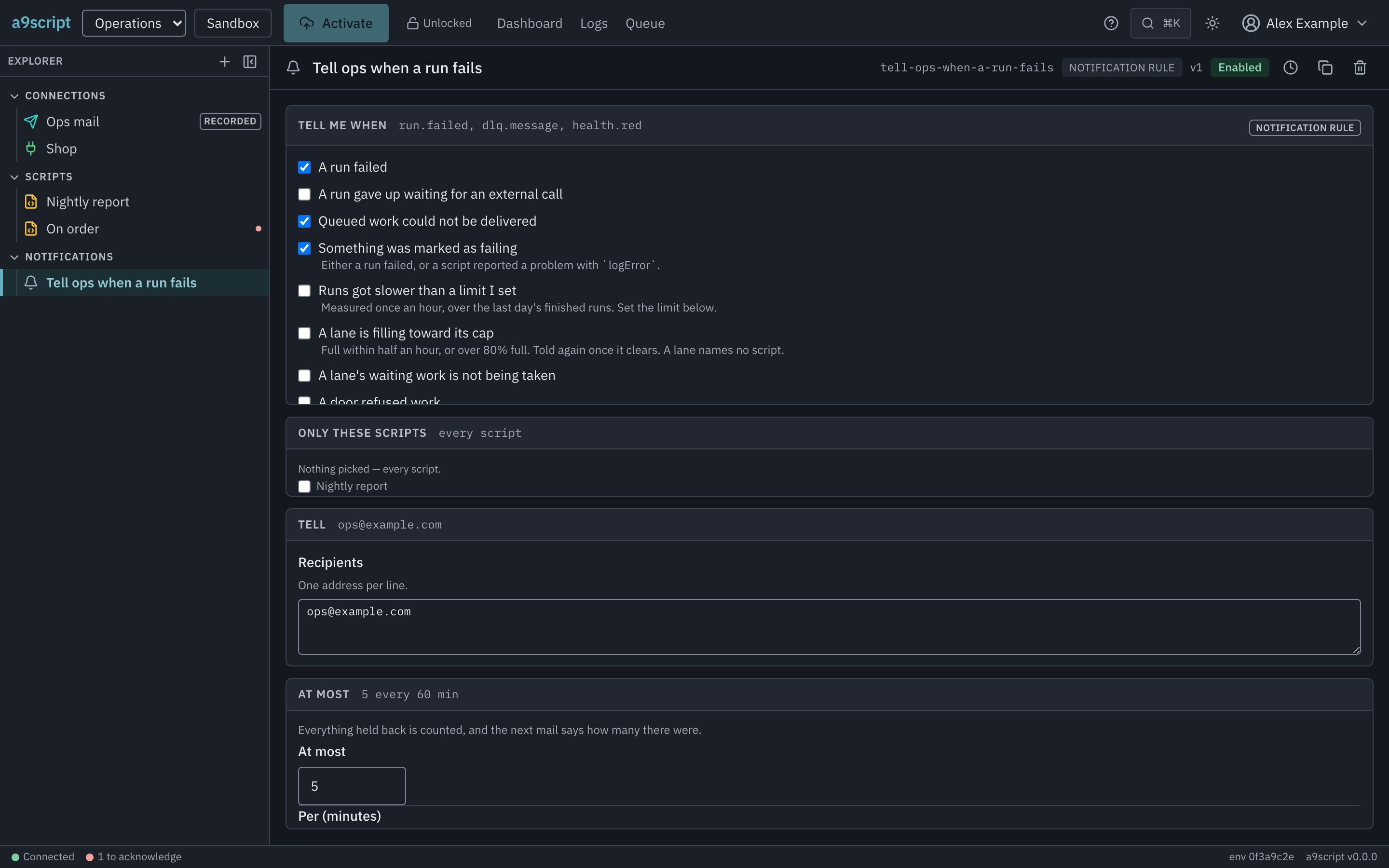
Four things about it are worth knowing before you rely on it.
It is throttled, always. 5 mails an hour by default, per rule. You can change the numbers; you cannot switch it off. This is not a limitation, it is the feature: a script that fails on every one of four thousand records overnight would otherwise send four thousand mails, and the fifth one would already have been ignored.
Nothing is hidden by the throttle. Everything held back is counted, and the next mail the throttle lets through ends with the count and the time the silence started:
…and 340 more since 02:14 UTC that were not mailed.So one mail never reads as one failure.
A mail that could not be sent is counted the same way. When the mail
server refuses a mail, the trail gets a notification.failed entry with the
refusal’s code, and the mail is added back to the count, together with the
count it carried: the next mail the throttle lets through after that includes
them in that line. A mail already waiting behind the refused one was counted
before the refusal and does not. The
server’s own words go to the installation’s log, not to the trail, because
they can name the recipients.
An environment holds at most 100 alert mails waiting for its mail server,
the one being sent included. Its mails go out one at a time, in order, and one
environment’s slow mail server never delays another environment’s mail. Once
100 are waiting, each further alert mail is dropped before the throttle counts
it. The trail gets one notification.dropped entry for the whole burst: how
many were dropped, the first and last moment, and which rules they came from.
An entry covers at most an hour of drops, so a longer burst gets several.
What the trail records
Every alert mail leaves an entry in the environment’s audit trail. An entry names the rule and the occurrence, never the recipients.
notification.sent— the mail went out. If the account only redirects or records mail, the entry says so.notification.suppressed— the throttle held it back; the next mail the throttle lets through counts it.notification.failed— nothing was sent, and the entry carries the code that says why: for example that the mail server refused it, that no mail account could carry it, that the rule names no recipient, or that the rules could not be read at that moment.notification.dropped— mails dropped because the environment’s backlog was full, one entry per burst, written within an hour of the burst’s start. It is also written when the installation stops before its alert mail is finished, with how much was left; mails still waiting then are not sent later, and the next mail after the restart counts them.
An entry for a mail the platform’s own address carried, or held back under the platform’s limits, says so.
Where the mailbox comes from
A rule does not carry a mail server; it sends through an Email out entity —
the same kind of configuration a sendMail from a script uses. Create one,
give it its transport (an SMTP host and credentials, or a Microsoft 365
mailbox), and Activate.
With exactly one account in the environment, leave the rule’s account blank and it uses that one. With several, name the one this rule should send through: the form then offers no blank choice, and activating a rule that names none says so — adding a second account later is what turns a blank into a refusal. An account a rule names cannot be deleted while the rule names it, and a promotion to the other environment carries it along.
With none, a rule usually cannot mail anybody — and whether it can is not yours to decide. The installation’s administrator can switch on a fallback that sends a tenant’s alerts from the platform’s own address when the environment has no mail account at all. It is off unless somebody turned it on, and it covers only this one case: a rule that NAMES an account which does not resolve, or names none where several exist, still refuses. An account that is switched off still counts as an account; the fallback does not send in its place.
Where the platform’s address carries your alerts, the platform’s limits apply, because every tenant on the installation shares that address:
- At most 10 recipients on one mail. Addresses are counted one by one: an entry holding several addresses separated by commas or semicolons counts each, and a repeated address counts once. The rest are left out, and the trail entry says how many.
- A throttle no looser than the default. The window is at least an hour and the number no higher than the default’s, whatever the rule sets. A rule stricter than that keeps its own numbers.
- Each mail counts against the environment’s sending allowance, the same
one a script’s
sendMailspends. A mail over it is not sent, and the trail records it asnotification.failed.
Your own Email out account has none of these limits: it sends every alert your rules allow, and those alerts do not count against the sending allowance.
Either way this is the state worth checking for yourself, because a rule with no
account still looks armed: it lists its occurrences, it is enabled, and it will
report where it runs rather than where it was saved. If you have set up
notification rules and never set up an Email out, ask your administrator whether
that fallback is on before assuming anything has been mailed. The trail also
answers it: a mail that had no account to go through leaves a
notification.failed entry with the code NO_ACCOUNT.
Layer 2: run a script
A system trigger is a trigger like any other. You add it to a main script, choose which occurrences it wants, and the platform runs that script when one happens — through the same pipeline a webhook goes through. It does not wait for the mail: a handler starts whether or not a notification rule’s mail went out, and a mail server that stops answering does not delay it.
The occurrence arrives as the body:
const failure = input.event.body;

// { kind, tenantId, environmentId, scriptName?, entity?, runId?, taskId?,
//   error?, triggeredBy?, metric?, lane?, at }

if (failure.kind !== "run.failed") return "not a failure I handle";

CreateTicket({
  summary: `${failure.scriptName ?? failure.entity?.name} failed`,
  description: `${failure.error.code}: ${failure.error.message}\nRun ${failure.runId}`,
  priority: "high",
});

return `raised a ticket for ${failure.runId}`;
CreateTicket there is a configured function of yours — the handler is an
ordinary script, so everything a script can do, it can do.
Watching one script instead of all of them
Only these scripts is the list of scripts whose failures this handler — or
this notification rule — reacts to. Leave it empty and it hears about every
script in the environment, which is the sane default for a first rule. Name
scripts in it and it hears about those alone, which is how you give one
integration its own reaction without every handler starting with an if.
It names scripts by their derived name — the same name a run records as its target and the log filters on. A name that matches no script, a script renamed or deleted while a list names it — each is said when you activate, because a list naming nothing hears nothing. Deleting the script is not refused: the list narrows what you hear, it does not depend on it.
A configured function’s failure is named as the function, never as a script:
its occurrence carries entity: { kind: "config_function", name } and no
scriptName, which is why the handler above falls back to entity. A list
naming a script of the same name does not hear it, and an empty list does.
Testing it before anything breaks
The Run panel offers a sample payload for each occurrence. Pick one and it fills the input; press Test. The samples are the real shape, so a handler that works against a sample works against the real thing.
The one rule you cannot turn off
A handler’s own failure never runs a handler.
If handle-failure breaks while reacting to a failure, that break is reported —
it is mailed by your notification rules, it appears in the logs, it marks the
script as failing — but it does not become another run of a handler.
One level of reaction, never a cascade. It is why you can write a handler that
listens for run.failed with no filter and not think about it again: the thing
that would loop cannot.
What to set up first
If you are starting from nothing, this order gets you the most for the least work:
- One notification rule on
run.failedandhealth.red, to an address a person actually reads. This is the whole point of the feature and it takes a minute. - A handler for the integration that matters most. Usually one script: raise a ticket, or post a message where the team already looks.
dlq.messagewhen you start caring about throughput. Work that could not be delivered at all is rarer and more serious than a failed run — it means the platform never got to try properly. What a dead letter is, and why looking at one is the only thing to do with it, is on When the work jams.
You do not need a handler per script. One handler with a filter, or one handler
that reads failure.scriptName (failure.entity for a configured function) and
decides, is usually the whole of it.