Docs / Endpoints
An endpoint an assistant can call
For whoever has built calls and scripts and now wants an assistant to use them.
An endpoint can offer its environment’s work as tools. An assistant points at the endpoint’s address, asks it what it can do, and calls one of the answers. The protocol it speaks there is MCP, the one assistants use to discover and call tools — which is the word to look for in whatever client you are pointing at it.
There is no server to write and no schema to keep: you say which of your configured calls and scripts are offered and what each one is for, and the door does the rest.
That is the whole of it. The door does not decide anything on its own, and it is the flat opposite of a general key to your environment: it offers only what an operation names. A configured call that is switched on and works perfectly is not reachable through this door until somebody adds an operation for it, and an entity’s own name is never an address.
The two decisions
Which door. An endpoint answers in one of four ways, and the choice is the What this door does with a call row on the endpoint: Accepts and does not wait is the webhook door, Answers the caller is the one on Answering a caller, Serves an app is Hosting a small app, and Offers tools is this one. Same endpoint, same path, same credential — what changes is what the caller says into it.
Which of your work it offers. Under What this door offers, each row is one tool: a name a caller says, the thing it reaches, and a sentence about what it does.
Making one
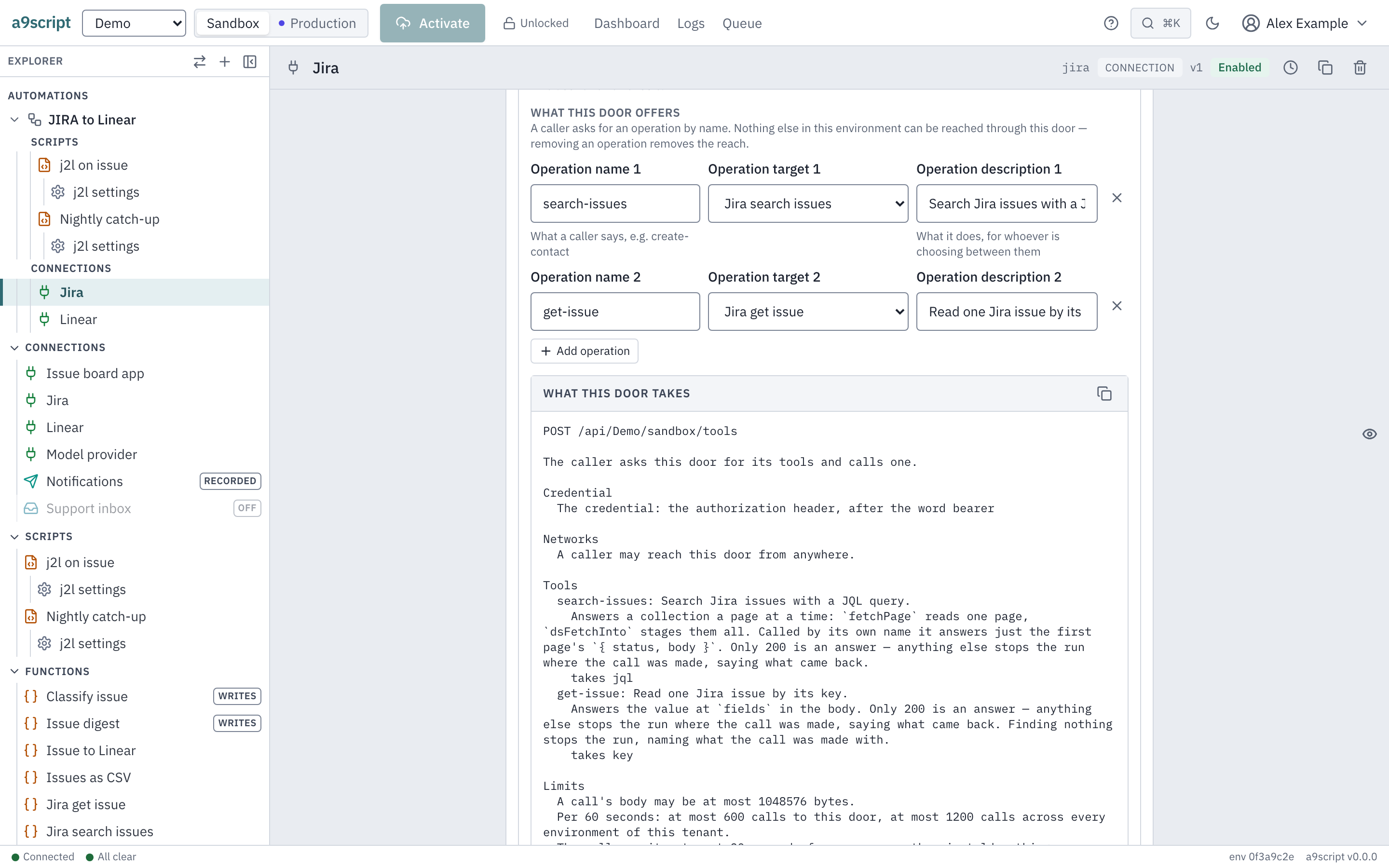
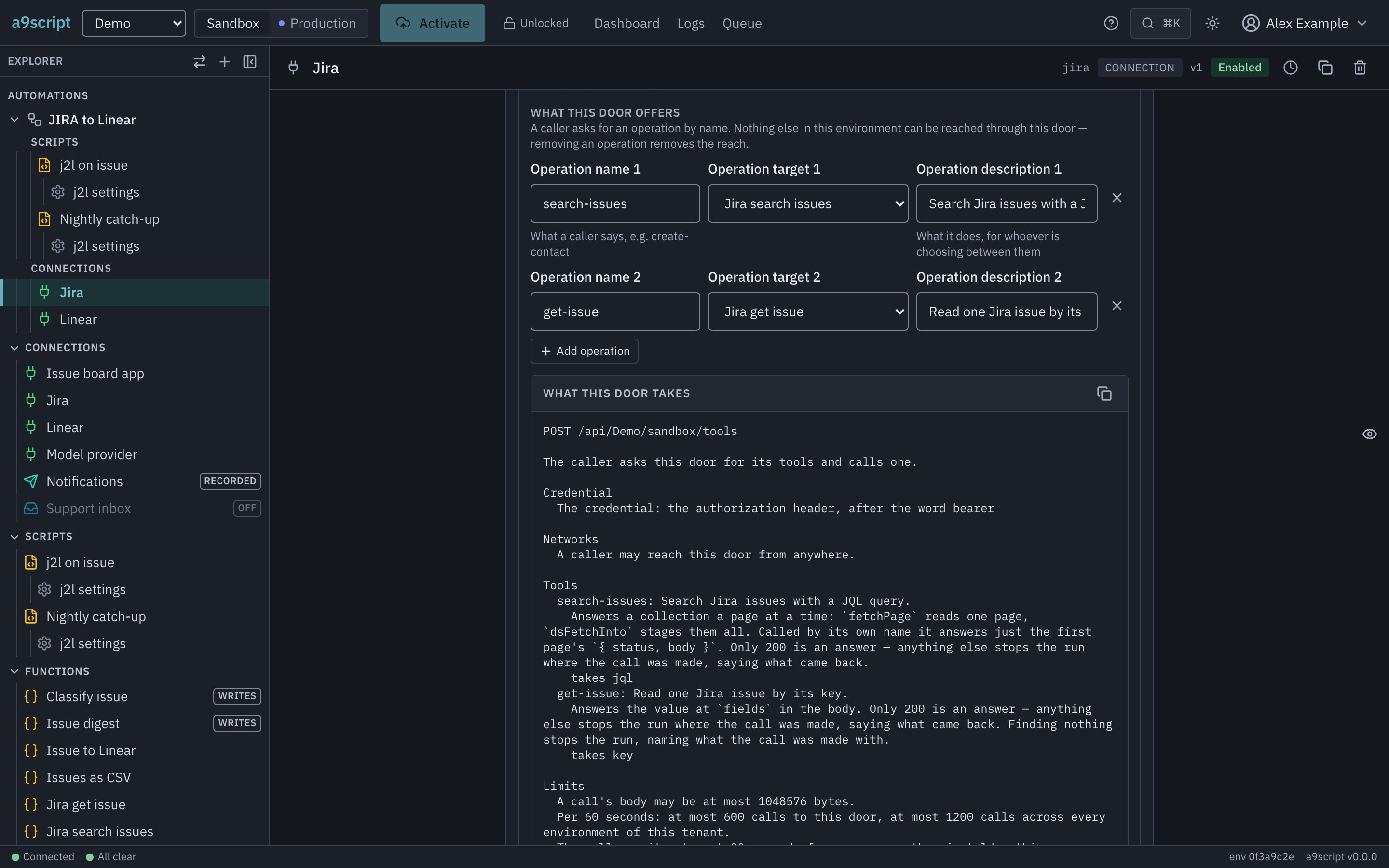
On the connection, add an endpoint and give it a path. Then:
Choose Offers tools. Two things change on the card. What this door offers appears — the tool table, empty, saying so. And What this door triggers stops offering to add a script, because this door takes no trigger at all: its list is its tools, and a script is reached by being named in one, never by listening. If you have used the other doors, that is the one habit to unlearn here.
Add an operation per tool. Three fields:
- Operation name — what a caller says: lowercase letters, digits and
hyphens, like
create-contact. - Operation target — the thing it reaches, picked from what this environment configures. It may be a configured call or a main script; both are on Connections and functions.
- Operation description — a sentence saying what it does. This is the one thing on the whole card the platform cannot work out for you, and it is the one that decides whether the tool is used well: an assistant chooses between tools on that sentence alone. A tool without one is offered anyway, marked as a tool nobody has said anything about, and warned about when you activate.
Give the door a credential. Unchanged from any other door — the Sender row, or Generic and then the kind of authentication you want. A door with none is a door anybody who learns its address can call.
Activate. Nothing is live until then, and it takes a moment afterwards for the door to start answering.
What a tool takes
You never write a tool’s arguments. They are generated from what its target already declares:
- A configured call offers one argument per declared parameter, and a parameter with a default is optional.
- A script offers the input structure it declares — the named shape on Parameter structures.
- A mapping takes the one value it maps, under the name
input. - A target that declares nothing takes anything, and the description says so rather than inventing a shape.
So the way to give an assistant a tool it can use correctly is to declare the target’s parameters and give each a description. That work pays twice: the same declarations are what the door checks an incoming call against, before any run starts, so a call with a missing or wrongly typed argument is refused as a bad request and costs you nothing.
The address, and reading it
The door answers at the endpoint’s own address:
POST /api/<tenant>/<environment>/<path>That is the same address as the door on Answering a caller — what a caller finds there is decided by the endpoint, not by the URL. Point the assistant’s client at exactly that, with nothing appended.
The endpoint’s card shows what a caller will be told, under What this door takes, with a button to copy it. It is not written in the browser: the card asks the running platform for it, so what you copy is what a caller gets.
POST /api/acme/production/assistant

The caller asks this door for its tools and calls one.

Credential
  The credential: the authorization header, after the word bearer

Networks
  A caller may reach this door from anywhere.

Tools
  create-contact: Creates a contact in the CRM.
    takes email, name
  find-contact — nobody has said what this does
    takes email
There is a Limits block below that, with the numbers this installation
actually holds a caller to; they are explained on
Limits and safety. From a terminal the same document is
a9script describe <path>, and a caller who fetches the address in a browser
gets it too — after the credential, never before.
The newest version of the protocol the door speaks is 2025-11-25, and it
answers older ones a client asks for.
Who may call it
The credential is judged before anything about the protocol. A caller who does not present it is refused identically whether it asked for the tool list, called a tool, or sent nonsense — so a stranger learns nothing about what this environment configures, not even that the door speaks this protocol at all.
An MCP door does not ask for a signed-in person. An MCP client presents the door’s credential and has no way to sign in as one of your App users, so Requires a signed-in person is not offered here — a tool list that differed by person would show every client the public tools alone, without a word. Every caller holding the credential sees the same tools.
When a call goes wrong
Three different things, answered in two different ways, and the difference is worth knowing before you debug the wrong one.
The request was wrong — an unknown tool name, an argument that does not fit what the tool declared — and the caller is told so as a protocol error. Nothing ran, and nothing was queued.
The work failed — the run happened and did not succeed. The caller gets a result marked as an error, carrying the platform’s own code and message, which is what lets an assistant read the reason and try something else. It is a run like any other: in the run log, in the environment’s health, with everything on When something is wrong available.
What the tool runs is switched off — the tool stays on the list, because
the list describes the door as it is configured, but calling it answers at once
with a result marked as an error, SCRIPT_DISABLED or FUNCTION_DISABLED,
naming the tool. Nothing ran and nothing was queued. A configuration that
cannot be read just now answers the same way, with CONFIG_UNAVAILABLE.
One case surprises people. A caller is holding the connection open waiting for its answer, so a tool call cannot pause and come back later the way a triggered run can. A short pause it can sit through, it sits through. A wait long enough that the platform would otherwise put the run down and pick it up later — a far end asking to be tried again in a while, a script asking for a real delay — is stopped instead: the caller is told so plainly, nothing is left running, and the far end was asked exactly once. Work of that shape belongs behind a webhook, where nobody is waiting; a tool that starts it and answers immediately is the usual way round it.
Work that slices itself is different, and does complete. A call that reads every page of a paged API, or walks a staged set row by row, cuts itself into segments without asking anybody to wait — and a tool call takes those segments one after another and answers when the work is done. What bounds it is the platform’s limit on how many times one call may pick itself back up: 100. A triggered run is exempt from that limit, because its segments are bounded by the work instead — pages pulled, rows walked — but the mechanism carrying the exemption is the same one that hands a run back to the scheduler, which is exactly what a tool call may not do. So a slice-heavy call that would run for thousands of segments in the background is the one to keep off a tools door.
A script answering a tool
A script reached by a tool call sees the arguments as its body, which tool did
it, and — where the door asks for one — who was calling. It answers with
respond, exactly as it would at the door beside it.
const email = input.event.body.customer;
const contact = FindContact({ email });

log("looked a contact up for a tool call", { tool: input.event.operation });

if (contact === null) {
  respond({ found: false });
  return { found: false };
}

respond({ found: true, id: contact.id, name: contact.name });
return { found: true, id: contact.id };
An object answer reaches the assistant as structured data as well as text; a bare value reaches it as text alone.
What to read next
- Answering a caller — the same address, answering an ordinary caller, and the reply budget both doors share.
- Connections and functions — the calls and scripts a tool points at.
- App users — the people a door can ask a caller to be.
An automated browser test performs this page’s acts against a running platform, every time the product changes — an author adds an operation to a door and sees it answer a caller, switches the door to offer tools and reads the generated description off the card, then asks the door itself for its tool list and gets the same thing back; finally the door is switched away from tools again, and both the operation and its reach go with it.