Docs / Endpoints
Hosting a small app
For whoever has built something and now wants people to use it.
An environment can serve a folder of files at a URL: a status page, an approval screen, a form that starts an integration. The page runs in a browser, signs people in at your environment’s own door, and calls the operations you already built. There is no second deployment, no second host to operate, and no build step, bundler or pipeline inside the platform — whatever you upload is what is served.
That also fixes what it is not. It serves files. It does not render pages on the way out, so anything a visitor sees has to be produced by the browser. If your app needs a build, run it on your own machine and upload the result.
Why apps get an address of their own
A browser decides what a page may touch by its address, and a page served from the authoring address could read your session and act as you. Everything else about hosted apps follows from that one sentence: they are served from a third hostname, alongside the one you author on and the one your webhooks arrive at.
Whoever installed the platform sets that address up. If app URLs answer “not found” and everything else works, that is the piece that is missing — it is described in running it on one box.
Making one
Three things, in this order.
A file store, set to Only you, by upload. That setting is the point: a store that scripts can write to is a store where a bug in a script becomes a change to the browser code every one of your app’s users then runs. The platform refuses to serve an app from one. Everything else about stores is on files and file stores.
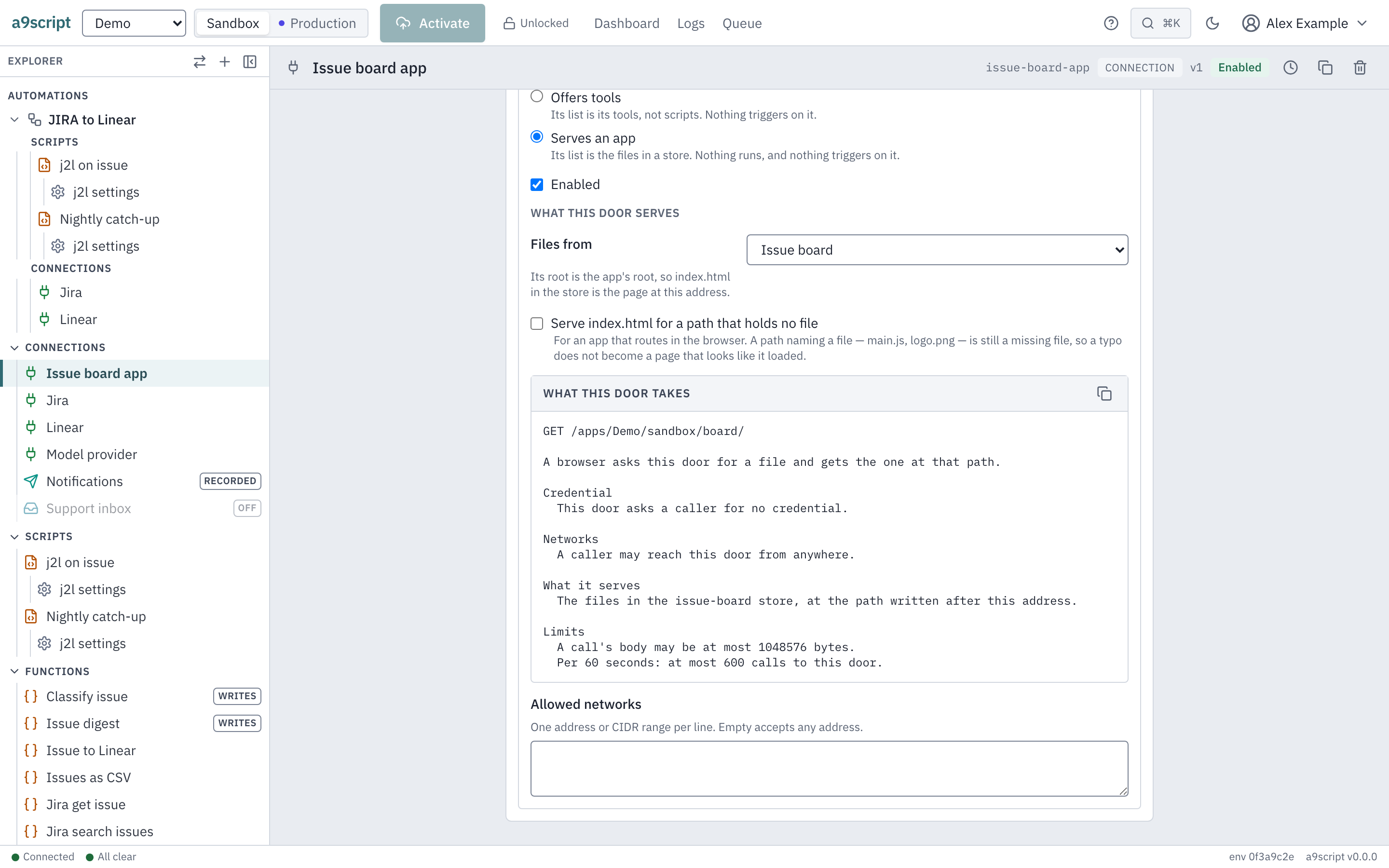
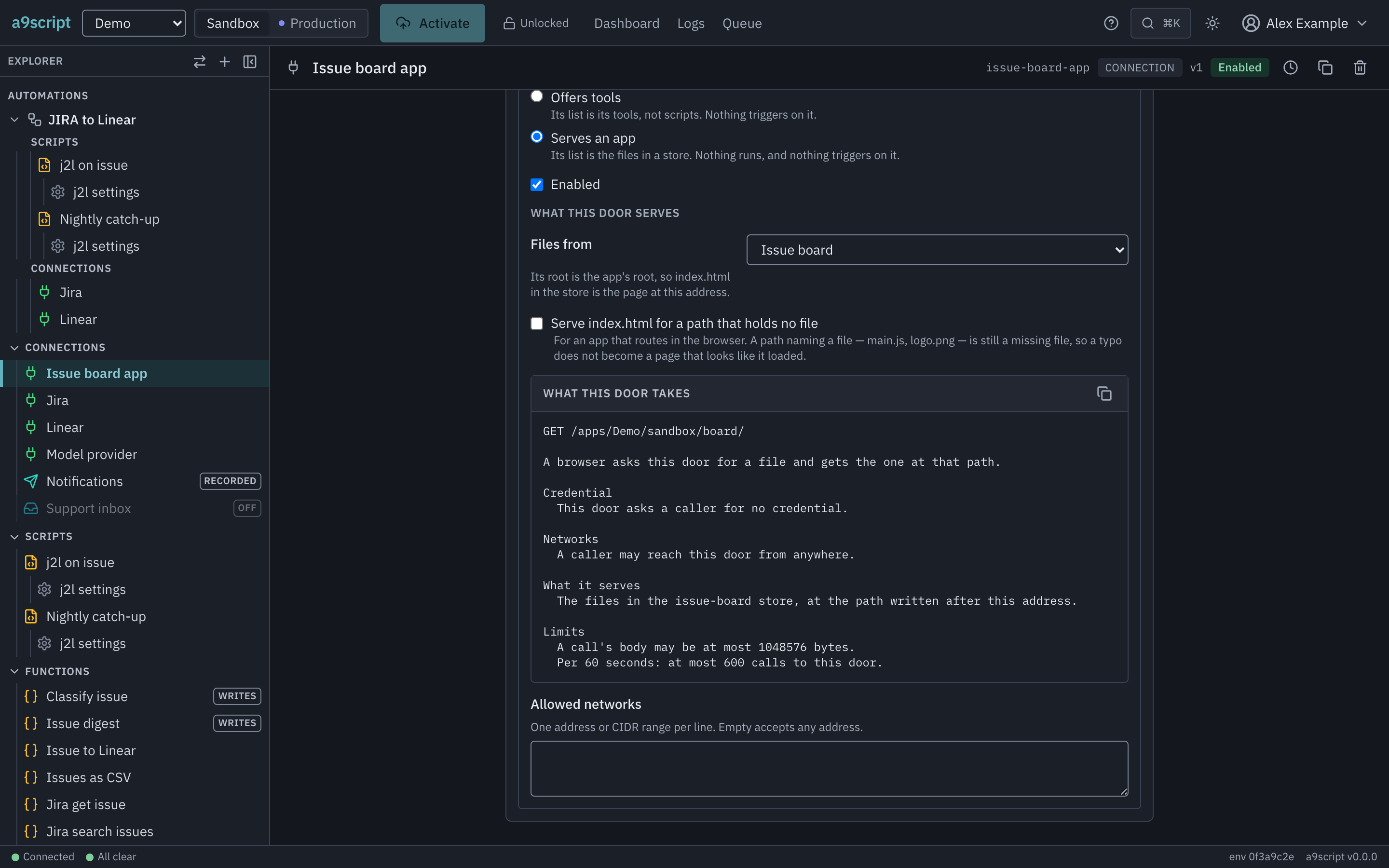
An endpoint that serves it. On the connection, add an endpoint, give it a
path, and choose Serves an app. The card then asks the one question an app
door has: which store its files come from. That store’s root is the app’s root,
so index.html in the store is the page at the app’s address, and
assets/main.js in the store is /assets/main.js under it.
An app door is deliberately thin. It presents no credential — a browser fetching a page sends none, and a door that claimed one would be telling you something untrue — it triggers no script, and it offers no operations. What it does have is the switch: turn it off and the app stops answering, like any other door. Its pages count against the app’s own door’s allowance, never the one your webhooks and API calls share, because one page is many files. The number is on Limits and safety.
The files. Upload them, and the app is live at the address shown on the endpoint.
Getting the files there
In the browser, the store’s own panel takes them one at a time. That is fine for a page and a stylesheet and tedious for anything real, so from a terminal:
a9script files upload-folder my-app-bundle --from ./distEvery file under the folder goes to its own path in the store, so the shape of
the folder on your disk is the shape of the URLs. Files whose name starts with
_ or . are skipped in every folder — your notes and your version control
are not part of what the world sees.
Uploading replaces, and nothing is versioned. The app is whatever the environment currently holds. There is no rollback here: to go back, upload the older files again. And an upload never deletes — a file you stop building is still being served until you remove it.
Files do not travel between environments, so promoting an app to production is uploading it there. That is what deploying an application means everywhere else, and it is deliberate: promoting moves configuration, and a compiled bundle is not configuration.
Paths that the browser routes
If your app handles its own routing — one page that swaps what it shows as the address changes — turn on Serve index.html for a path that holds no file. A visitor landing deep in the app then gets the app rather than a “not found”, and the app takes it from there.
It stays off by default, and even when it is on, a path that names a file is
still a missing file. A mistyped main.js answered with your index page is a
browser reporting a syntax error in a script it never had — which is a much
worse afternoon than a plain “not found”.
Talking to its backend
The app calls its own environment’s API door, as whoever is signed in. Nothing
new is involved: the door, the operations, who may call which, and the
input.caller your script reads are the ones already described in
answering a caller and app users.
Two things are worth knowing before the first call.
The page’s own visitors sign in at the environment, not here. They are app users — a separate population from the people who author, with their own sign-in and their own roles. Invite them from the tenant, as that page describes.
Only your app’s address may read the answers. The door answers a browser call from the address this installation serves apps at, and from nowhere else, so a page somebody else put on the internet cannot read your environment’s answers even from somebody who is signed in to it.
Before you give an app to somebody outside
On a normal installation every tenant’s app is served from one address, which means every tenant’s app is same-origin with every other one: mutually readable, by design, because the tenants are all the same organisation’s. That is fine while it is true and stops being fine the moment it is not.
Before an app is given to a tenant you do not control, whoever installed the platform gives each tenant an address of its own. It is a configuration change rather than a rebuild, and it is written down for them where the addresses are set up.
Three automated browser tests perform this page’s acts against a running platform, every time the product changes. The first is this page in order: an author creates a store, points an app door at it, uploads a page, loads the app at its URL, then turns on the fallback and watches a routed path get the app while a mistyped asset still does not. The second proves the claim the page opens with — the authoring session is never sent to the app’s address. The third signs a person in from the app’s own page and reads back what a script answered for that person, then watches the same call refused from an address that is not the app’s.