Docs / Data, files, mail
Files and file stores
Some things an integration needs are not values. A logo that goes on every generated PDF, a template somebody in the business maintains, a fixture you test against, the CSV a partner emailed — these belong somewhere they can be put once and used by every run afterwards.
That somewhere is a file store: a named container you create in the environment, and then put files into by name.
A store is configuration; the files in it are not
You create a file store the way you create anything else — it has a name, it is activated, and it travels between your environments like the rest of your configuration.
The files inside it do not travel. Promoting a store to production gives you an empty store there, and you upload what production needs. That is deliberate: a file is data, and putting a 20 MB image through the versioning machinery would keep a copy of it in every version of your configuration, for ever.
It also means the files are never in your change history. What is recorded is who put a file somewhere and when — not what was in it.
Who may write
Every store answers one question: who is allowed to put files in it.
- Scripts and callers — the ordinary kind. Your scripts write to it, and so can the callers behind your endpoints. It grows, so it can carry limits.
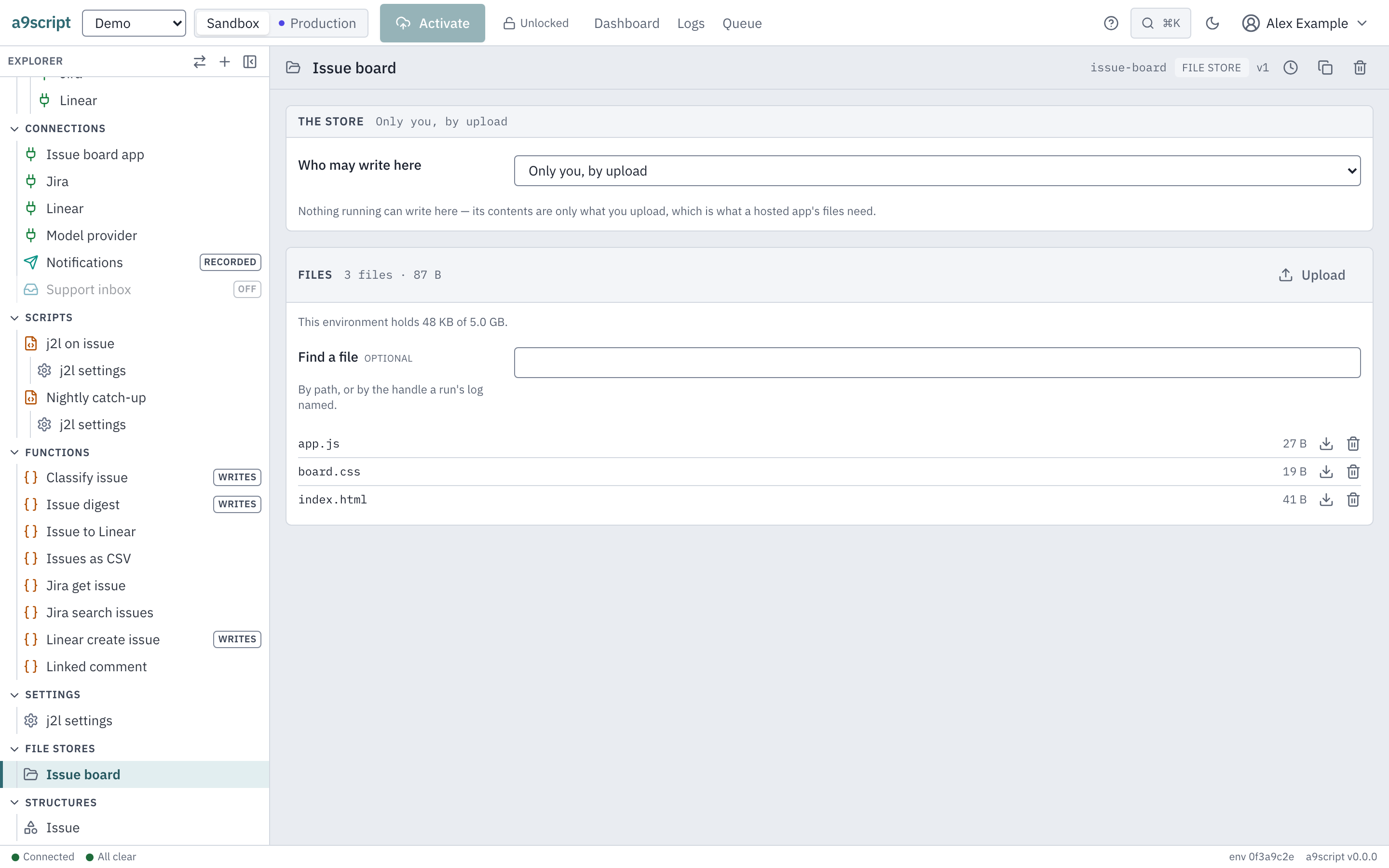
- Only you, by upload — nothing running can write to it. Its contents are exactly what you uploaded, which is what a set of files you serve needs.
A script that tries to write to the second kind is refused, and told why.
Putting things in and taking them out
By hand, the store’s own page lists what it holds and takes an upload.
From a terminal:
a9script filestore create assets
a9script files upload assets logo.png --from ./logo.png --type image/png
a9script files list assets
a9script files download assets logo.png --out ./logo.png
a9script files delete assets logo.png
And from a script, by name:
writeFile("greeting.txt", base64Encode("hello"), { mime: "text/plain" });
const file = readFile("greeting.txt");
return base64Decode(file.contentBase64);
Neither call names a store, so both mean the store you marked as this environment’s default. Name one when you want a different one:
writeFile("report.csv", base64Encode("sku,qty\nA-1,2\n"), { store: "workspace" });
return readFile("report.csv", { store: "workspace" }).bytes;
Writing a path again replaces what was there. There is nothing to delete first, and no version of the old one is kept.
Paths, not handles
A file is addressed by its path in its store, and a path may contain slashes —
assets/js/app.js is one file in a store, not a folder you have to make first.
This is different from the handles you get from writeBlob. A handle is a
fingerprint of the contents: right for the platform to pass around, and useless
as something a person types or recognises. A path is the opposite, which is why
the things people put somewhere on purpose live in a file store.
The two do not mix: writeFile gives you back where the file landed, not a
handle, and the calls that take a handle take one from writeBlob.
What it costs, and what stops it growing
Three limits apply, in this order, and every one of them refuses before any bytes are kept.
One file may be at most 256 MB. This is far above what a script may hold at once, because it is sized for the things people upload rather than the things scripts pass around. An upload has 60 seconds to arrive whole, so a file that size needs at least 4.3 MB a second on the way in (about 36 Mbit/s). On a slower link, upload smaller files, or ask your operator to give uploads more time.
One store may carry limits of its own — a number of bytes, a number of files, or both. Left empty, a store has no limit of its own and only the environment’s total applies.
One environment may hold 5120 MB in total, counting its stored files and its integration data together. It is the same total a script’s own storage is judged by, so there is one number rather than two.
A store that is full refuses the write, and says so. Nothing is deleted to make room unless you asked for that — see below.
A listing answers at most 1000 files a page, by path. The store’s page
shows the first and reads more on Show more; a9script files list walks
every page for you. A caller of the door itself continues with after, the
path the last page named as next.
Letting a store look after itself
A store you use as scratch space fills up, and the default behaviour is to stop accepting writes until somebody clears it. Two settings change that, and you turn them on per store:
- Delete files older than an age you choose. Files past it are removed on the platform’s regular housekeeping pass, so a store of working files trends back towards empty on its own. It measures when a file was last written.
- Drop the oldest files to make room, which makes the store behave like a cache: when a write would not fit, the least recently used files are removed until it does. A file bigger than the whole store is still refused, rather than emptying it for nothing.
They answer different questions — what is simply old, and what nobody has wanted lately — so a store may use both.
What a file store is not
It is not a place to keep records: for the things a sync compares and updates, use a dataset. It is not versioned, so it is not a place to keep the history of anything. And nothing in it is encrypted beyond what protects the disk it sits on, which is worth knowing before you put a copy of somebody’s contract in one.