Docs / Endpoints
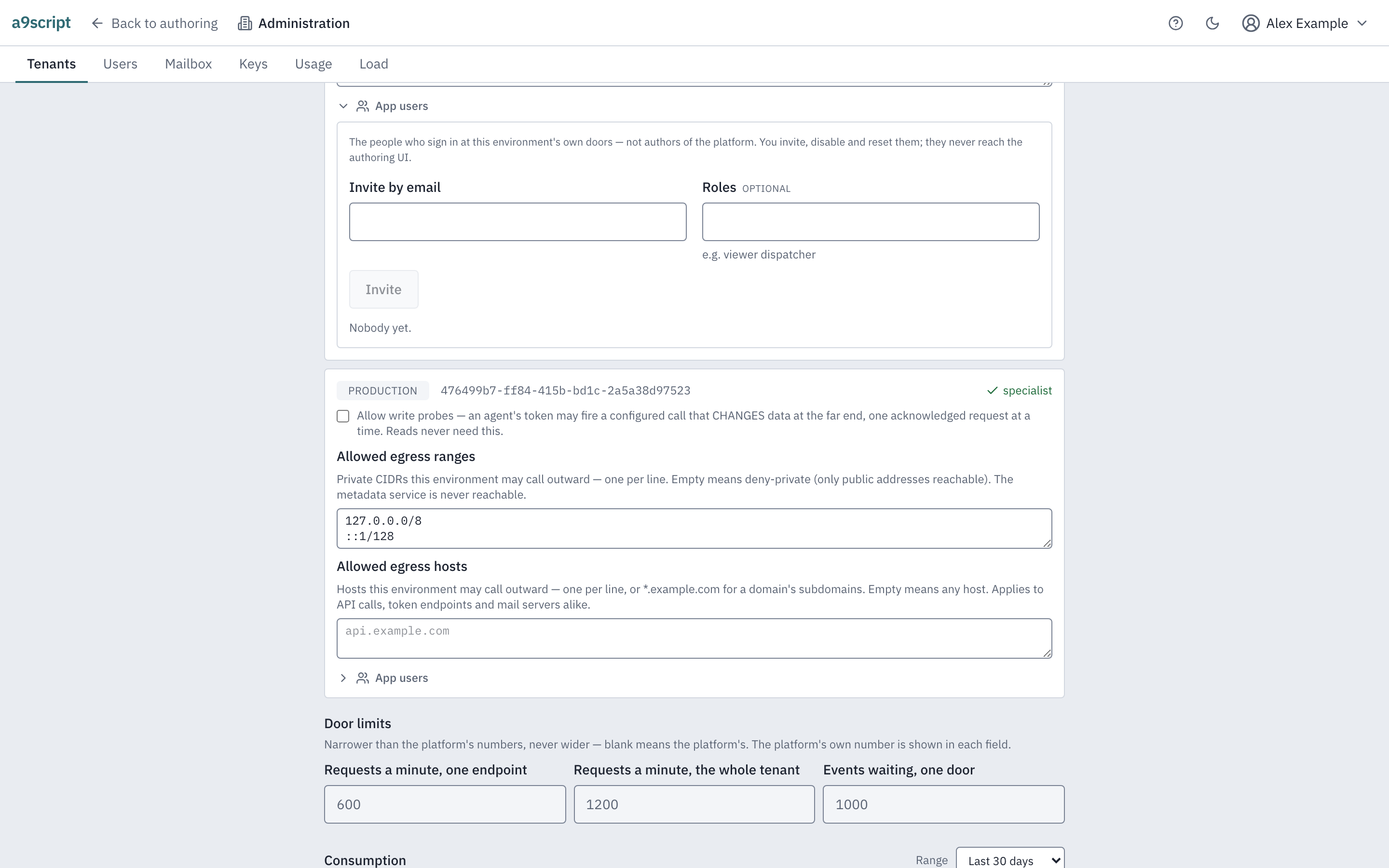
App users: the people who call your environment
For whoever administers a tenant.
There are two entirely separate populations here, and telling them apart is the one thing worth being careful about.
Authors hold a platform account. They sign in to this interface, build and change what an environment runs, and are granted their access by whoever administers the tenant or the installation. That population is People and access.
App users are different. They are the people your environment’s own doors answer — a tenant’s staff or its customers — and they never reach this authoring interface at all. They exist per environment, sign in at the environment’s own address, and hold roles your environment names. Someone can be both — an author who is also a user of the app they built — but the two are separate sign-ins that share nothing but an email address. Inviting somebody as an app user grants them nothing here; it cannot.
You manage them from a tenant’s detail, under each environment. The place they usually meet your environment is a page it serves them — hosting a small app.
Inviting somebody
Give an address and the roles they should hold, and send the invitation. The person is created without a password — they cannot sign in yet — and an email goes out through your environment’s own mail account, not the platform’s. The platform writes to authors about their platform accounts; your app writes to its own people, as itself. So an environment needs a mail account configured before an invitation can go anywhere, and the invitation is sent with whatever that account is set to do — if it is set only to record, the mail is recorded rather than delivered, exactly like everything else it sends.
The invitation carries a link the person opens to set a password — a small page the platform serves for exactly this, on the same address that serves hosted apps, so an installation that hosts apps has it already. An installation that knows no such address refuses the invitation and says which setting is missing, rather than sending a link nobody can open. The link is good for a limited time and then stops working; sending a fresh invitation replaces any earlier one, so the newest link is the only one that works.
If the mail cannot be sent, the invitation is refused and nobody is half created — you will not be left with a person who exists but was never told.
Roles
A role is a name your environment gives it — viewer, dispatcher, whatever
your own vocabulary is, spelled the way the platform spells a name:
lowercase letters, digits and hyphens. viewer and sales-ops are roles;
Viewer and sales_ops are refused, and refused at both ends, so a role
cannot exist on a person under a spelling no operation can name.
An app user holds none, one or several. What a role means is decided where an author says which callers may reach which of the environment’s operations: an operation may be open to anyone, to anyone signed in, or to holders of particular roles — see answering a caller. The roles here and the roles an author writes on an operation are the same names, and neither side is a registry the other has to be added to first.
Changing somebody’s roles takes effect on their very next call — there is nothing to sign out and back in for.
Signing in
A person signs in to the environment, not to one endpoint, and one sign-in reaches every door of that environment they are entitled to. There are three addresses, all POST:
/api/<tenant>/<environment>/_identity/sign-in
/api/<tenant>/<environment>/_identity/sign-out
/api/<tenant>/<environment>/_identity/set-password
The _identity segment is the trick that makes them safe: an endpoint path is
lowercase letters, digits and hyphens, so no door you configure can ever claim
it.
A successful sign-in sets a cookie. It is scoped to the origin by the browser’s own rule and to that environment’s doors by its path, so two environments are two cookies and neither reaches anything else on the host. Nothing about the authoring product is involved: an app user cannot sign in to it, and its sessions are not these.
A failed sign-in gives one answer, whatever was wrong. A wrong password, an address nobody has, somebody who was invited and never finished, somebody who has been disabled — all the same refusal, because anything else would let a stranger discover who exists here. The same is true of the completion door: an unknown, expired or already-used link is one answer.
Failures are counted per address, and enough of them in a row lock that address out for a while. Every attempt spends from a second, larger budget as well — success included, because minting sessions is exactly what somebody with a stolen password does. Signing out spends from it too, so none of the three addresses can be used to find out which tenants and environments exist.
An environment also checks only so many passwords at a time, whatever address they come from. Under a flood, sign-in answers “too many requests” and asks the caller to try again in a second — nobody is locked out by it, and other environments are untouched. Setting a password has its own allowance, so a flood of sign-ins never stops somebody completing an invitation.
A session has an absolute lifetime and nothing slides it: when it ends, the person signs in again, whatever they were doing meanwhile. The installation chooses the number.
Disabling, and resetting
Disable turns somebody off. They can no longer sign in, and any session they already had stops working at once — not at its next expiry, immediately. Enable brings them back; they sign in again as before.
Reset sends a fresh password link, the same way an invitation does. It is for the person who forgot theirs, or whose access you want to force through a new password. Their old password stops working once they complete the new one.
Disabling is the reach you have over an app user; you do not delete them from here. A person turned off holds nothing and reaches nothing, which is what “remove their access” means for this population.
What lands in the trail
Every one of these acts — an invitation, a reset, a disable or enable, a role change, and the person’s own completing of their password — is recorded in the environment’s own audit trail, where a tenant administrator reads it. It is the tenant’s record of its own people, and it never appears in the installation’s administrator log, which is about platform accounts alone.
Failed sign-ins and a locked-out address trying again are recorded there too. Under a flood the first few a minute are recorded in full; the rest are counted, and the count names none of them.
An automated browser test performs this page’s acts against a running platform, every time the product changes — a tenant administrator invites a person into an environment, that person sets a password from the emailed link and signs in at the environment’s own door, and the administrator then disables them (so the door refuses them) and changes their roles — so the page cannot outlive the behaviour it describes.